How are tickets organized in the portal?
Tickets in Raiseaticket are organized using several methods:
- By Status: Open, Pending, In Progress, Resolved, Closed.
- By Priority: Based on your SLA policy priorities (e.g., High, Medium, Low).
- By Category: Custom categories you define (e.g., Billing, Technical, General).
- By Assignment: Assigned to specific agents or groups.
Filtering options:
- Status, Priority, Category, Department, Group.
- Agent assigned, Tags, Date range
- Company, Channel (email/web), Due date
Sorting: By date created, last updated, priority, or due date.
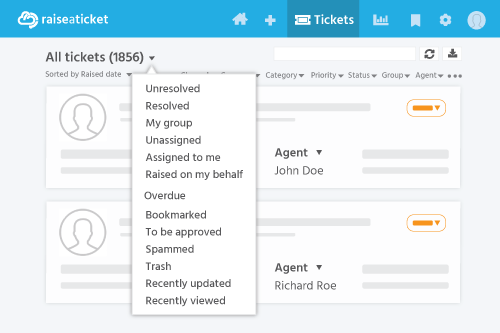
Views:
- Agents see tickets assigned to them and their group.
- Admins see all tickets across the portal.
- Customers see only their own tickets (or company tickets if enabled).
Setting this up from scratch? The ticket handling workbook builds a priority grid from impact and urgency, then the flow from triage through On Hold to closed, and gives you a policy to hand the team.
Last reviewed17 August 2026
Maintained byRaiseaticket Support
Applies toFree plan
