Can I merge multiple tickets into one?
Yes, you can merge duplicate or related tickets into a single ticket:
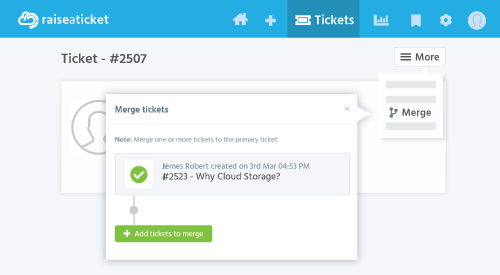
- Open the primary ticket (the one you want to keep).
- Click More menu > Merge
- Search for and select the tickets to merge into this one.
- Confirm the merge
What happens when you merge:
- All replies and notes from merged tickets are combined into the primary ticket.
- The merged (secondary) tickets are closed and marked as merged.
- Attachments from all tickets are preserved.
- The primary ticket keeps its assignee, status, and SLA.
Can I un-merge? Yes, an admin can un-merge tickets if needed. The previously merged tickets will be restored as separate tickets.
Note: Merge is available to Agents and Admins only.
Last reviewed17 August 2026
Maintained byRaiseaticket Support
Applies toFree plan
Required roleAdministrator
