How do I configure email notifications for ticket actions?
To set up which actions trigger email notifications:
- Go to Settings > Notifications (or Email Templates).
- You will see notification categories:
- Admin notifications (system events).
- Agent notifications (ticket assignments, replies).
- User notifications (ticket updates, responses).
- Toggle each notification on or off.
- Customize the email template content for each notification
.
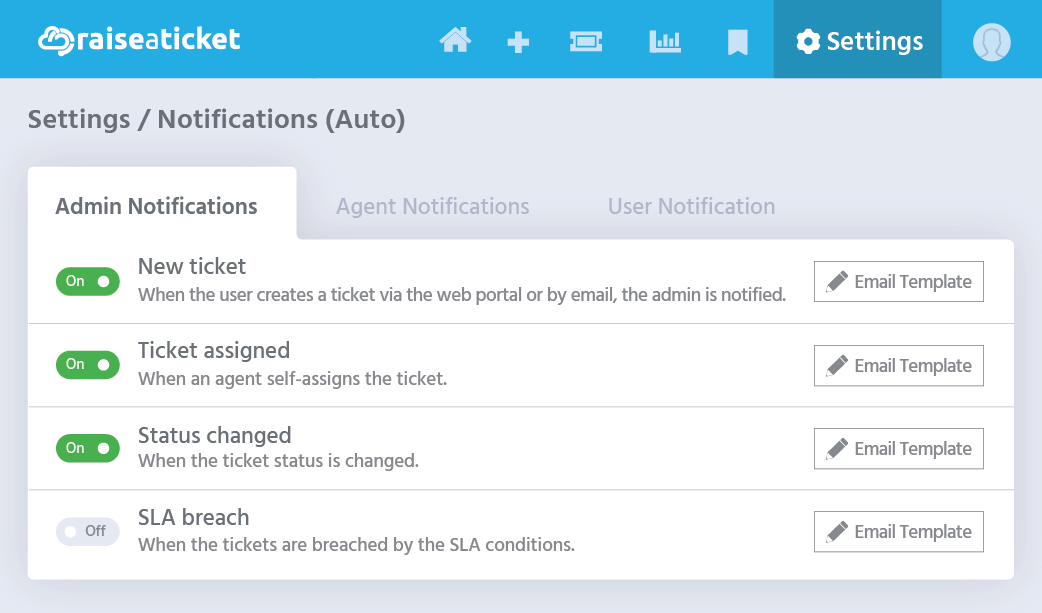
Common notifications:
- New ticket created (to agent/admin)
- New reply from customer (to assigned agent).
- Ticket assigned (to agent)
- Ticket resolved/closed (to customer)
- SLA breach warning (to agent/admin)
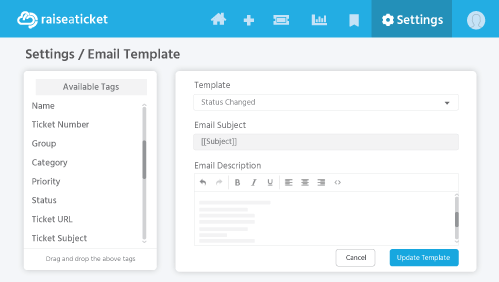
Each template supports dynamic tags (e.g., {TICKET_NO}, {AGENT_NAME}) that auto-fill with actual values.
Last reviewed17 August 2026
Maintained byRaiseaticket Support
Applies toFree plan
Required roleAdministrator
