How do I block a user from submitting tickets?
To block a user from creating tickets (via email or web portal):
1. Go to Settings > Users
2. Find the user you want to block
3. Click on the user to open their profile
4. Click "Disable User".
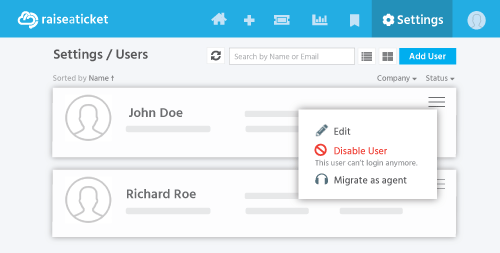
Once disabled:
- The user cannot submit new tickets via email or web portal.
- Their existing tickets remain in the system for reference.
- The user cannot log in to the portal.
To re-enable the user later, go to their profile and click "Enable User".
Note: This is different from marking a ticket as spam. Disabling a user blocks ALL future communication from them. Marking a ticket as spam moves only that specific ticket.
Last reviewed17 August 2026
Maintained byRaiseaticket Support
Applies toFree plan
Required roleAdministrator
