Is SLA calculation ignored on holidays?
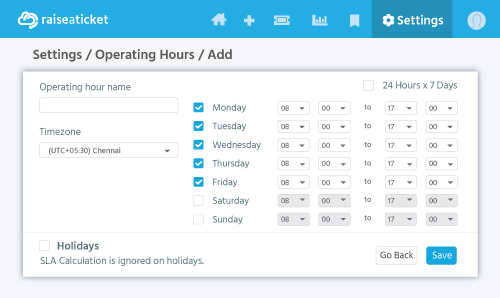
Yes, you can ignore the SLA calculation on holiday by selecting the holidays check box. Go to Settings > Operating Hours, open the operating hours your SLA uses, tick Holidays, select the holidays from the calendar, enter the holiday reason and then click save. The SLA clock does not run on those dates.
Holidays apply only to SLA policies counted in Operating Hours. A policy set to Calendar Hours counts every day, including holidays. The Default operating hours have the Holidays box ticked but no dates, so nothing is excluded until you add them.
Designing your own? The SLA policy workbook walks through the six decisions behind a policy that survives a real week - priorities, operating hours, holidays, pausing the clock, targets and who owns a breach - and assembles one you can copy.
More on this topic: help desk SLA guide.
