How do I set up Microsoft Teams or Slack notifications?
Raiseaticket can send real-time ticket notifications to your team's Microsoft Teams or Slack channels.
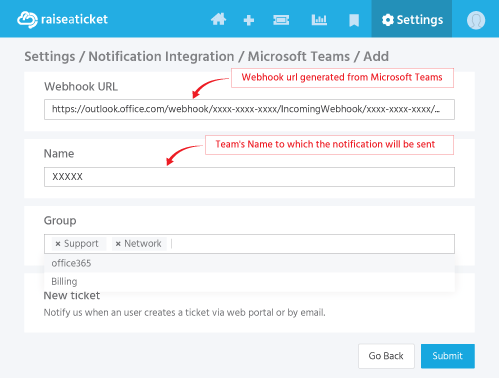
For Microsoft Teams:
- Go to Settings > Notifications > Microsoft Teams.
- Create an Incoming Webhook in your Teams channel.
- Copy the webhook URL.
- Paste it in Raiseaticket notification settings.
- Select which events trigger notifications (new ticket, reply, assignment, etc.)
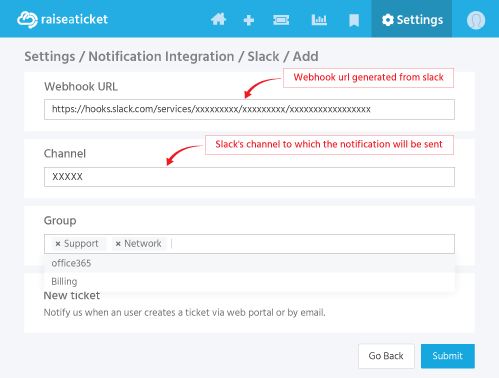
For Slack:
- Go to Settings > Notifications > Slack
- Create an Incoming Webhook in your Slack workspace.
- Copy the webhook URL
- Paste it in Raiseaticket notification settings.
- Select notification events
Notifications you can enable:
- New ticket created
- Ticket assigned or reassigned
- New reply received
- Ticket status changed
- SLA breach alert
Last reviewed17 August 2026
Maintained byRaiseaticket Support
Applies toPremium add-on
Required roleAdministrator
