How do I configure custom ticket statuses?
To create and manage custom ticket statuses:
- Go to Settings > General > Statuses
- Click "Create Ticket Status" to create a new one
- Configure:
- Status name (what agents and customers see)
- Color (for visual identification in ticket lists).
- SLA Timer behavior: Running, Paused, or Stopped.
- Show Agent Reply: whether this status appears as a response option.
- Save
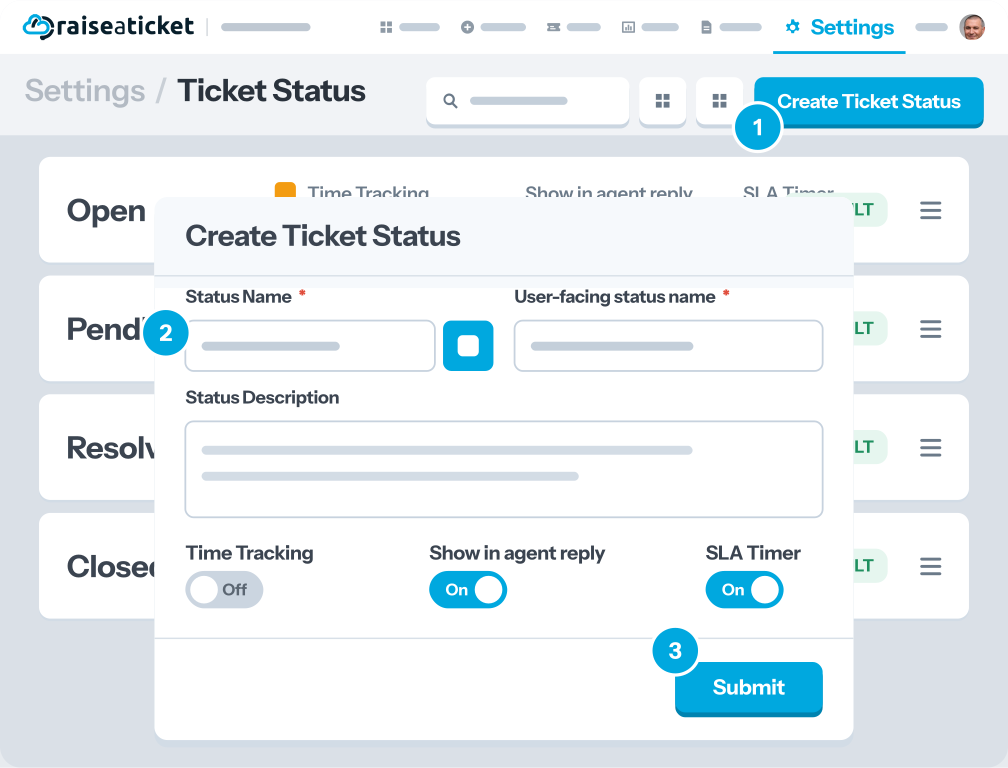
Built-in statuses (Open, Pending, Resolved, Closed) cannot be deleted but can be customized.
Tips:
- Use "SLA Timer: Paused" for statuses where you are waiting on the customer.
- Keep status names short and clear for easy identification.
- You can enable/disable statuses without deleting them.
Setting this up from scratch? The ticket handling workbook builds a priority grid from impact and urgency, then the flow from triage through On Hold to closed, and gives you a policy to hand the team.
Last reviewed17 August 2026
Maintained byRaiseaticket Support
Applies toFree plan
Required roleAdministrator
