Can I export tickets from my portal?
Yes, you can export ticket data from your portal:
Exporting tickets:
- Go to Tickets (or Reports)
- Apply any filters you need (date range, status, agent, etc.)
- Click "Export" or the download icon
- The file downloads with a timestamped filename.
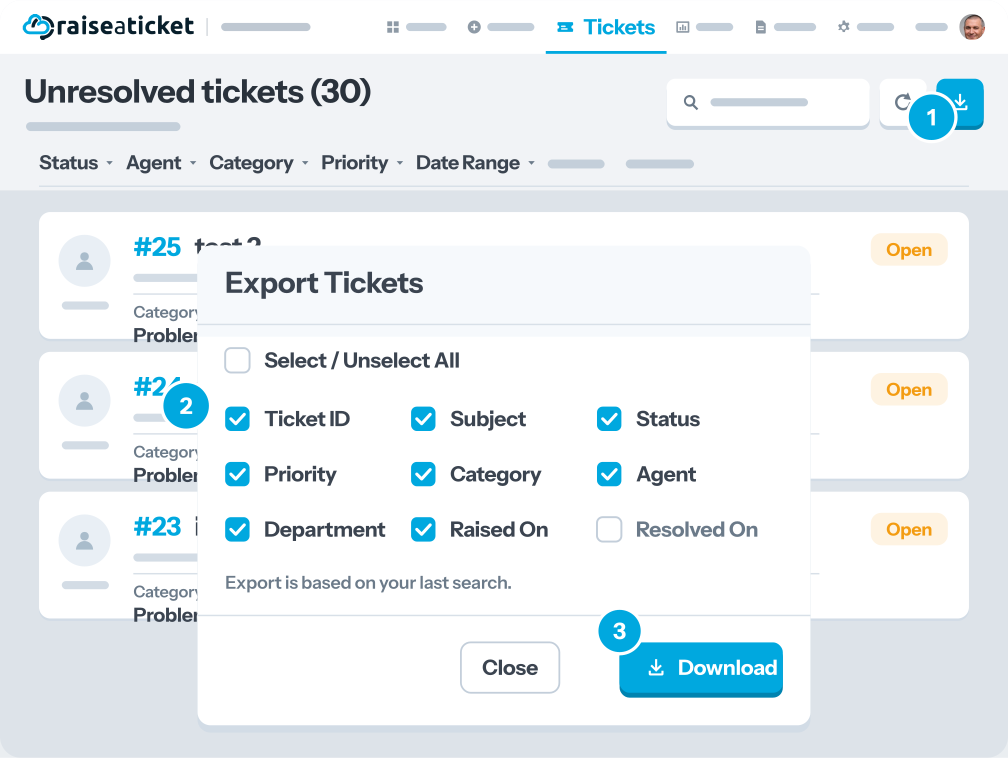
Exported data includes:
- Ticket number, subject, status, priority.
- Created date, resolved date
- Assigned agent, category, department
- Response time, resolution time
Note: Only Admins can export ticket data. Agents may have limited export access.
Last reviewed17 August 2026
Maintained byRaiseaticket Support
Applies toFree plan
