What is a helpdesk ticketing system?
A helpdesk ticketing system is software that records every customer or employee request as a ticket, then tracks it from the moment it arrives to the moment it is resolved. Each ticket carries an identifier, a status, an owner and a deadline, so a request cannot quietly disappear the way an email in a shared inbox can.
How a ticket moves through the system
- Capture. A customer emails your support address or submits a form, and a ticket is created automatically.
- Triage. The ticket is given a priority, a category and an owner, either manually or by rule.
- Work. Agents reply, add private notes for colleagues, and update the status as things progress.
- Resolve and measure. The ticket closes, and its first response and resolution times feed your reports.
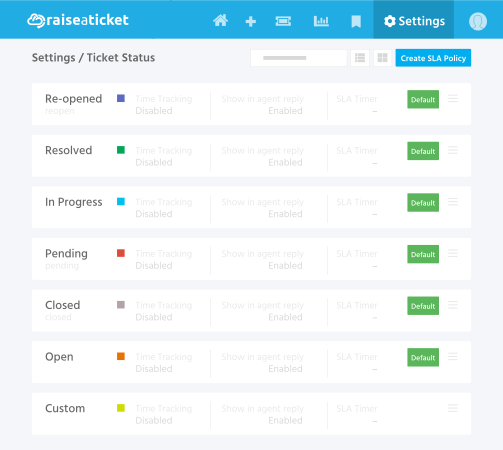
The ticket statuses and what they mean
- Open - created by an agent or a customer. First response time is measured from here.
- In Progress - active work is under way.
- Pending - waiting on an external party such as a vendor or a developer. Time on hold affects how long the customer waits.
- Resolved - the agent believes the issue is fixed.
- Closed - the customer has accepted the resolution. Resolution time runs from creation to closure.
- Reopened - closed previously, then raised again because the problem returned or was not fully solved.
What does this look like over a few days?
A customer writes on Monday morning about a failed export. The ticket opens, is triaged as Medium and assigned to the reporting team. By the afternoon it is In Progress; on Tuesday it moves to Pending while a developer confirms a fix, so the waiting time is recorded against the vendor rather than the customer. Wednesday it is Resolved, and once the customer confirms, Closed - with the first response and total resolution times both measured automatically.
Why teams move off a shared inbox
A shared mailbox works until it does not. The usual signs are requests being answered twice or not at all, no clear owner for anything, and no way to answer simple questions such as how long customers typically wait. A ticketing system fixes those by giving every request an owner, a status and a measurable clock. It also builds a searchable history, so the second person to hit the same problem is not starting from nothing.
What to expect from a good one
Email and portal capture, SLA policies that respect your business hours, a knowledge base so customers can self-serve, reporting on volume and response times, and security that does not cost extra - multi-factor authentication and role-based access. Satisfaction ratings on resolved tickets tell you whether any of it is working.
Is a free helpdesk ticketing system realistic?
It depends what is capped. Raiseaticket is free forever for 5 agents and 500 tickets a month, with no credit card and no expiry date. It is not a trial. The complete core helpdesk is available from the first day, including SLA management, reporting and the knowledge base. Single sign-on, automation, asset management, change management and the REST API are premium add-ons rather than part of the free plan.
You can see how it works on the helpdesk ticketing system overview.
If you are weighing up several options, our guide to the best free help desk software explains how to tell a genuine free plan from a trial.
