What is the Timesheet report and how does it work?
The Timesheet report shows how much time was spent, on what, and by whom, during a period you choose. It reports on logged work rather than tickets - which explains most of its surprising behaviour.
What it reports on
A ticket appears whenever time was recorded against it inside your date range, regardless of when the ticket was created. Time is split into Operating and Non-Operating hours based on each group's business hours.
Results can be grouped by Ticket, User or Company.
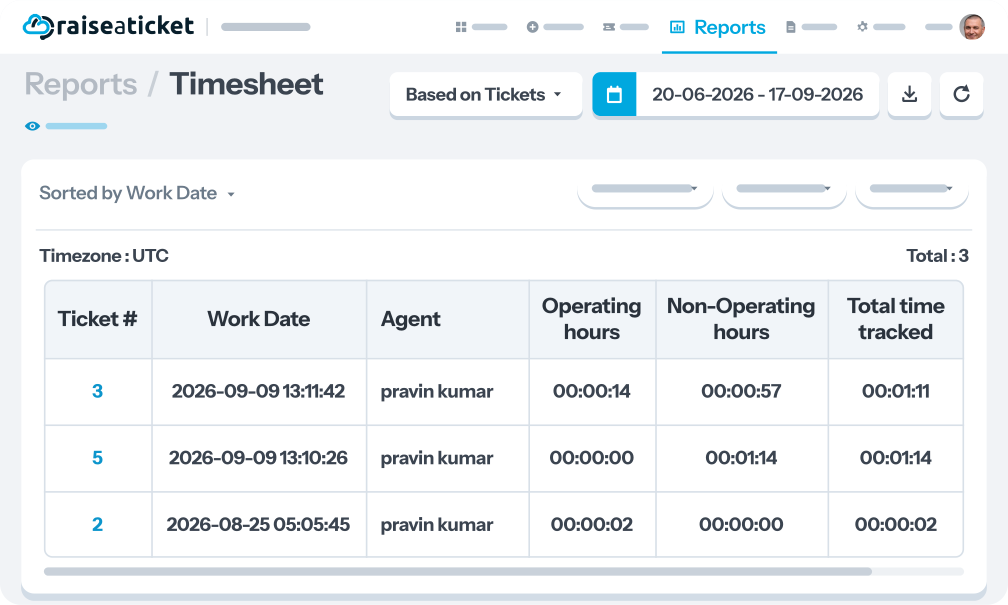
The columns
|
Column |
Shows |
|
Work Date |
The most recent day time was recorded on that ticket within your range. Every row therefore falls inside the period you picked. |
|
Manual Time |
The portion of the time added by hand rather than captured by the live timer. |
|
Total time tracked |
Operating and Non-Operating hours combined for that ticket across the period. |
Report based on decides how rows are grouped - one row per Ticket, per User (the requester), or per Company. It also changes which columns appear and how time is totalled.
How rows are ordered
By Work Date, newest first, with the ticket number as a stable tie-breaker. That tie-breaker is why paging never repeats or drops a row.
Troubleshooting
|
Symptom |
Cause |
|
The report is empty |
No time was logged in that window. Nothing is broken - widen the date range or clear a filter. The range is about when work happened, not when tickets were created. |
|
A ticket created weeks ago appears in this week's report |
Someone logged time on it this week. The report is time-driven, so it is dated by when the work happened rather than by ticket age. |
|
Totals look higher than expected |
A ticket worked on across several days contributes all of its in-range time to a single row, dated by its latest Work Date. One row can represent several days of work. |
|
It says "updated 5 mins ago" |
When the end date is today, the range is trimmed to a few minutes ago rather than running to the current second. That trim is what the note refers to. |
